

Jomog
  • Home
  • About Us
  • News
  • Politics
  • Entertainment
  • Health
  • Sports
  • Gist
  • Contact Us
No Result
View All Result
Jomog
No Result
View All Result
Home News

Step-By-Step Guide On How To Modify NIN Details From Home

by Editor
August 22, 2024
Step-By-Step Guide On How To Modify NIN Details From Home
Share on FacebookShare on TwitterShare on Whatsapp

In recent times, Nigerians have faced significant challenges with identification verification, particularly the stress of queuing at National Identity Management Commission offices and designated centres.

RELATED POSTS

Presidency Criticizes Makinde’s Call for UN Probe Into Oyo School Abductions

Xenophobia: Final South Africa evacuation flight to return 315 Nigerians Wednesday

Fresh Herdsmen Attack Triggers Mass Exodus in Benue Community

As the agency responsible for managing Nigeria’s national identity database, NIMC has been pivotal in this process, but the associated logistical hurdles can be daunting for many.

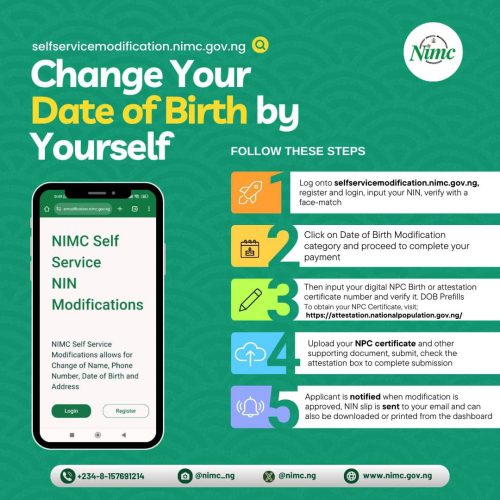
To alleviate this burden and streamline the process, PUNCH Online has developed a comprehensive DIY guide designed to empower individuals to manage their NIN (National Identification Number) details modification from the comfort of their homes.

Details about the personal update and modifications were retrieved from the NIMC social media handles late Wednesday.

This step-by-step guide provides clear instructions for updating your personal information—whether it’s your name, address, date of birth, or other details—without the need to visit a physical NIMC office.

With this straightforward guide, Nigerians can now effortlessly update their National Identification Number details, avoiding the inconvenience of long queues and ensuring that their personal information remains accurate and current.

The NIN is used as a unique identifier for Nigerian citizens and legal residents in various administrative processes, including accessing government services, opening bank accounts, and verifying identity.

To be eligible to use the NIMC short code, make sure your phone number has met the following requirements:
– Make sure your phone number is linked to your NIN registration to use this shortcode service.

– Modification requests are subject to verification and approval by NIMC.

– You may be charged a fee for the modification service.

Here is the step-by-step guide to modifying your NIN using the shortcode:
Step 1: Dial the Short Code
Dial *346# on your mobile phone.

Step 2: Select NIN Modification
Select the “NIN Modification” option from the menu.

Step 3: Enter NIN
Enter your 11-digit National Identification Number (NIN).

Step 4: Verify NIN
Verify that your NIN is correct and proceed to the next step.

Step 5: Select Modification Option
Select the modification option you want to update (e.g., name, date of birth, address, etc.).

Step 6: Enter New Details
Enter the new details you want to update.

Step 7: Confirm Changes
Confirm that the new details are correct.

Step 8: Receive Confirmation Code
You will receive a confirmation code via SMS.

Step 9: Confirm Modification
Enter the confirmation code to complete the modification process.

Step 10: Receive Update Confirmation
You will receive a confirmation message indicating that your NIN has been successfully updated.


 

Related Posts

Presidency Criticizes Makinde’s Call for UN Probe Into Oyo School Abductions
News

Presidency Criticizes Makinde’s Call for UN Probe Into Oyo School Abductions

Xenophobia: Final South Africa evacuation flight to return 315 Nigerians Wednesday
News

Xenophobia: Final South Africa evacuation flight to return 315 Nigerians Wednesday

Fresh Herdsmen Attack Triggers Mass Exodus in Benue Community
News

Fresh Herdsmen Attack Triggers Mass Exodus in Benue Community

No CBN Account, No Funds Disbursed To Fake Council — OAGF
News

PFIPC Dispute: ‘I Am In Hiding Due To Death Threats, Not Law Enforcement,’ Says Adeyemi

56 Days of Rain and Sun: Rescued Oriire Principal Recounts Grueling Forest Ordeal
News

56 Days of Rain and Sun: Rescued Oriire Principal Recounts Grueling Forest Ordeal

BREAKING: 39 Pupils, 7 Teachers Abducted in Oriire Rescued Alive After 56 Days
News

DSS to Arraign Wives of Oriire School Kidnappers in Abuja

Next Post
You Can’t Get 50% Of Husband’s Properties After Divorce Under Nigerian Laws – Lawyer Tells Women

You Can’t Get 50% Of Husband’s Properties After Divorce Under Nigerian Laws – Lawyer Tells Women

NJC Ratifies New Supreme Court Justices, Set To Forward Final Names To Tinubu

Just In: Olukayode Ariwoola Bows Out As Chief Justice of Nigeria

More Reports

Presidency Criticizes Makinde’s Call for UN Probe Into Oyo School Abductions

Presidency Criticizes Makinde’s Call for UN Probe Into Oyo School Abductions

Xenophobia: Final South Africa evacuation flight to return 315 Nigerians Wednesday

Xenophobia: Final South Africa evacuation flight to return 315 Nigerians Wednesday

Fresh Herdsmen Attack Triggers Mass Exodus in Benue Community

Fresh Herdsmen Attack Triggers Mass Exodus in Benue Community

No CBN Account, No Funds Disbursed To Fake Council — OAGF

PFIPC Dispute: ‘I Am In Hiding Due To Death Threats, Not Law Enforcement,’ Says Adeyemi

56 Days of Rain and Sun: Rescued Oriire Principal Recounts Grueling Forest Ordeal

56 Days of Rain and Sun: Rescued Oriire Principal Recounts Grueling Forest Ordeal

BREAKING: 39 Pupils, 7 Teachers Abducted in Oriire Rescued Alive After 56 Days

DSS to Arraign Wives of Oriire School Kidnappers in Abuja

Father Devastated After 28-Year-Old Lieutenant Son Dies a Hero in Oyo Rescue Operation

Father Devastated After 28-Year-Old Lieutenant Son Dies a Hero in Oyo Rescue Operation

© Jomog.com.ng

No Result
View All Result
  • Home
  • About Us
  • News
  • Politics
  • Entertainment
  • Health
  • Sports
  • Gist
  • Contact Us

© Jomog.com.ng